PRODUCT REVIEW
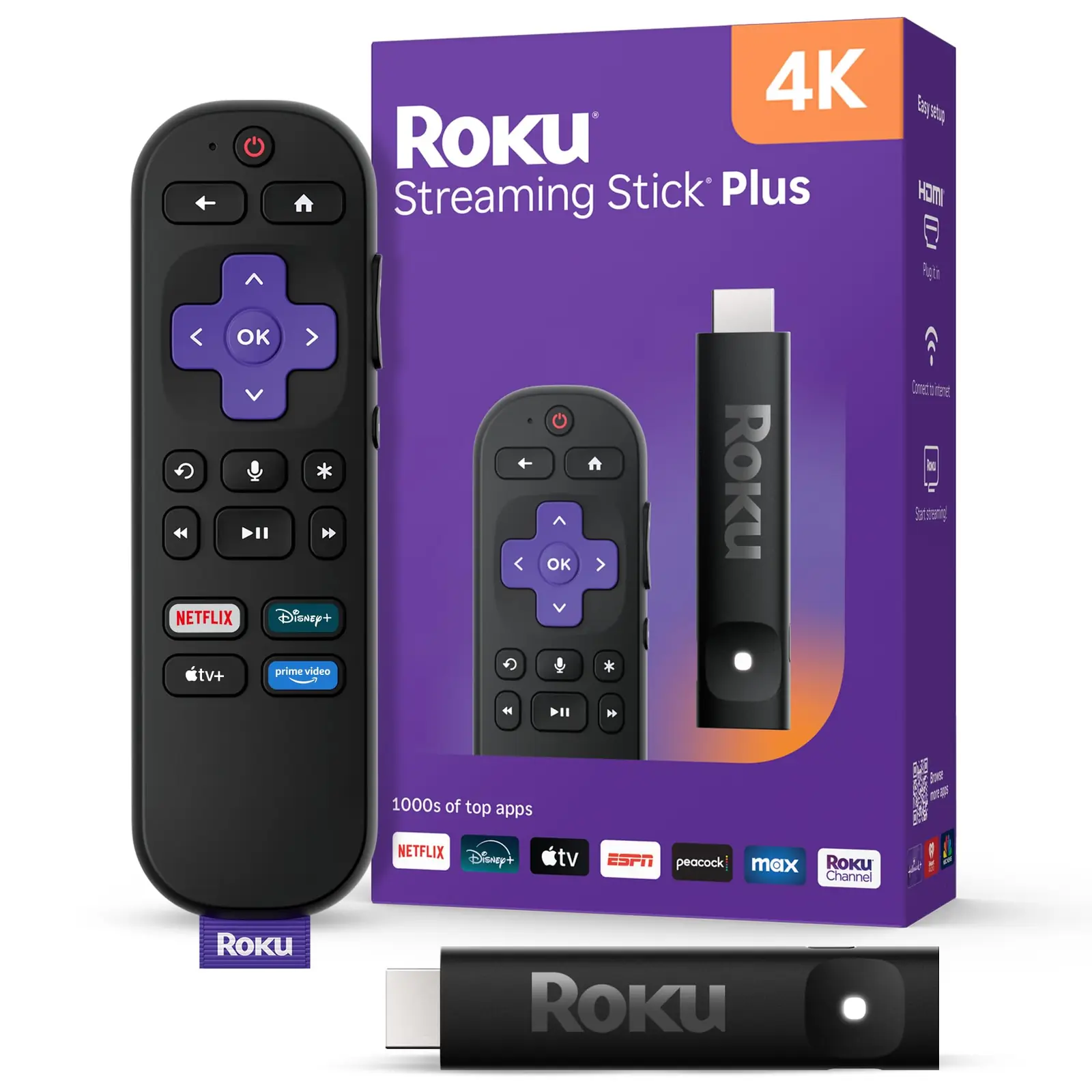
Roku Streaming Stick Plus 4K (3830R) Review: The Simple TV Upgrade
- Model
- 3830R
- ASIN
- B0DXY833HV
- Release year
- 2025
Check Current Price
Check price on Amazon →PRICE DISCLOSURE
Prices, availability, seller details, subscriptions, and included accessories can change. Confirm the final terms on the seller or manufacturer website. Affiliate links — AIFOLUNE may earn a commission at no extra cost to you.
Based on official product information, documentation, and independent market research. No hands-on testing is implied unless the article explicitly says otherwise.
Roku Streaming Stick Plus is designed as the straightforward middle option in Roku’s current range: sharper than the HD Streaming Stick, cheaper than the Dolby Vision-capable Streaming Stick 4K, and far simpler than Roku Ultra.
QUICK VERDICT
An excellent low-cost upgrade for a 4K HDR10+ television when simplicity, portability, and TV-powered installation matter most. Spend more on Roku Streaming Stick 4K for Dolby Vision, or Roku Ultra for Dolby Atmos, Ethernet, Wi-Fi 6, and a premium rechargeable remote.
BEST FOR
This model is best for upgrading an older 4K television, replacing a slow built-in smart-TV interface, adding streaming to a guest room, or carrying a familiar platform while traveling. Skip it if Dolby Vision and Atmos are priorities, if Wi-Fi reception is difficult enough to require Ethernet, or if your current TV platform already runs every needed app quickly and reliably.
MAIN TRADE-OFF
There is no Dolby Vision or Dolby Atmos support, no Ethernet port, and no Wi-Fi 6.
COMPLETE SETUP
Confirm the included accessories and any stand, mount, cable, adapter, or software needed for your workflow.
AT A GLANCE
Key Specifications
- Model: 3830R
- ASIN: B0DXY833HV
- Release year: 2025
- Model: 3830R; ASIN: B0DXY833HV
- Video: up to 4K 2160p at 60 fps
- HDR: HDR10 and HDR10+
- Wireless: dual-band 2.4/5 GHz Wi-Fi and Bluetooth
- Dimensions: 3.7 × 0.8 × 0.45 in
- Weight: approximately 0.9 oz (26 g)
- Launch MSRP: $39.99
THE TRADE-OFFS
Pros and Cons
Pros
- Affordable 4K and HDR10+ playback
- Can be powered directly by many televisions
- Compact design does not need an HDMI cable
- Useful voice remote with TV controls
- Bluetooth and mobile-app headphone modes
- Broad app selection and Apple AirPlay support
Cons
- There is no Dolby Vision or Dolby Atmos support, no Ethernet port, and no Wi-Fi 6.
- The remote uses conventional batteries and lacks the rechargeable battery, backlit buttons, hands-free voice control, and remote finder supplied with Roku Ultra.
- Performance is aimed at normal streaming rather than demanding local media libraries or gaming.
BEST MATCH
Who It’s For
This model is best for upgrading an older 4K television, replacing a slow built-in smart-TV interface, adding streaming to a guest room, or carrying a familiar platform while traveling. Skip it if Dolby Vision and Atmos are priorities, if Wi-Fi reception is difficult enough to require Ethernet, or if your current TV platform already runs every needed app quickly and reliably.
THINK TWICE
Who Should Skip It
There is no Dolby Vision or Dolby Atmos support, no Ethernet port, and no Wi-Fi 6. The remote uses conventional batteries and lacks the rechargeable battery, backlit buttons, hands-free voice control, and remote finder supplied with Roku Ultra. Performance is aimed at normal streaming rather than demanding local media libraries or gaming.
THE PRODUCT
Product Overview
Roku introduced the current Streaming Stick Plus in April 2025. Model 3830R is a compact HDMI player that streams at up to 2160p and 60 frames per second with HDR10/10+ support. It connects over dual-band Wi-Fi, supports Bluetooth headphone listening, and can draw power from a compatible television’s USB port. Amazon US currently labels it Amazon’s Choice, shows 10K+ purchases in the past month, and ranks it among the leading streaming media players; marketplace signals can change.
DEEPER LOOK
Detailed Review
Setup and everyday use
The stick plugs directly into an HDMI port and is slim enough to avoid blocking most neighboring connections. Its USB-C power cable can run from a suitable USB port on the television, reducing cable clutter and removing the need for a nearby wall socket. After connecting to Wi-Fi and signing into a Roku account, the player handles app updates automatically and presents a simple grid-based home screen.
Picture and format support
Streaming Stick Plus outputs HD and 4K video and supports HDR10/10+, along with common H.264/AVC, H.265/HEVC, AV1, and VP9 codecs. The main compromise is the absence of Dolby Vision. If a television supports Dolby Vision and you want that format from Netflix, Disney+, Apple TV+, or other compatible services, Roku Streaming Stick 4K is the better match.
Remote, private listening, and voice control
The included Voice Remote adds push-to-talk search, app shortcuts, and power and volume controls for most televisions. Bluetooth Headphone Mode can send audio directly to compatible headphones, and private listening is also available through the Roku mobile app. The device works with selected Alexa, Google Home, and Apple Home integrations, and supports Apple AirPlay; exact commands and availability vary by platform and region.
Apps and free content
Major US services include Netflix, Prime Video, Disney+, Hulu, Apple TV+, YouTube, and many more through the Roku Channel Store. Roku also promotes more than 500 free live channels through The Roku Channel. App catalogs, free channels, sports rights, and subscription prices differ by country, so international buyers should check regional availability before ordering a US model.
OTHER OPTIONS
Alternatives
Choose Streaming Stick Plus for a normal 4K HDR10+ television and the lowest practical cost. Streaming Stick 4K adds Dolby Vision and is worth the upgrade for compatible premium TVs. Roku Ultra is the better home-theater option because it adds Dolby Vision, Dolby Atmos, Wi-Fi 6, Ethernet, USB playback, and the rechargeable Voice Remote Pro, but it costs substantially more and is not as portable.
COMMON QUESTIONS
Frequently Asked Questions
Does it support Dolby Vision? No; it supports HDR10 and HDR10+. Does it need a wall outlet? Often no—the stick can use a suitable USB port on the TV, although insufficient USB power may require an adapter. Does it include the voice remote? Yes, with push-to-talk search and compatible TV power and volume controls. Can Bluetooth headphones connect directly? Yes, and private listening is also available through the Roku app. Are streaming services free? The device has no mandatory monthly fee, but most premium apps require their own subscriptions and free-channel availability varies by region.
FINAL CHECK
Ready to decide?
Confirm the current configuration, included accessories, seller, and final price before ordering.
KEEP EXPLORING
Related Buying Guides

KEEP EXPLORING