SOFTWARE REVIEW
OBS Studio 32.2 Review: The Free Standard for Streaming and Recording
Check Current Price
Download OBS Studio free →PRICE DISCLOSURE
Prices, availability, seller details, subscriptions, and included accessories can change. Confirm the final terms on the seller or manufacturer website.
Based on official product information, documentation, and independent market research. No hands-on testing is implied unless the article explicitly says otherwise.
The open-source broadcaster remains the default recommendation for creators who need flexible live production without a subscription or platform lock-in.
QUICK VERDICT
Still the best free streaming and screen-recording platform for creators willing to configure it carefully. OBS is powerful, transparent, and extensible, but beginners must learn encoding, audio routing, scene design, and plugin discipline to get reliable results.
BEST FOR
OBS is ideal for streamers, educators, podcasters, webinar hosts, gamers, software trainers, churches, events, and creators recording screen-and-camera tutorials. Users who need only occasional video calls may find it unnecessary, while mission-critical broadcasts should include redundant recording and network plans.
MAIN TRADE-OFF
The interface assumes technical concepts that beginners may not know.
COMPLETE SETUP
Confirm the included accessories and any stand, mount, cable, adapter, or software needed for your workflow.
AT A GLANCE
Key Specifications
- Free and open source
- Windows 10/11, supported macOS versions, and Linux
- Unlimited scenes and many source types
- Per-source audio filters and VST support
- Studio Mode and custom transitions
- Local recording and live streaming
- Plugin ecosystem
- Version 32.2 adds a redesigned source workflow and other production improvements
THE TRADE-OFFS
Pros and Cons
Pros
- No subscription or watermark
- Cross-platform and open source
- Flexible scenes and capture sources
- Strong recording and live-streaming options
- Large plugin and community ecosystem
- Works with major streaming platforms
- Suitable for simple capture or complex live shows
Cons
- The interface assumes technical concepts that beginners may not know.
- Incorrect encoder, bitrate, canvas, or audio settings can cause dropped frames, desynchronization, poor recordings, or excessive file sizes.
- Plugin conflicts and OS capture restrictions can complicate troubleshooting, while advanced collaboration requires additional services or tools.
BEST MATCH
Who It’s For
OBS is ideal for streamers, educators, podcasters, webinar hosts, gamers, software trainers, churches, events, and creators recording screen-and-camera tutorials. Users who need only occasional video calls may find it unnecessary, while mission-critical broadcasts should include redundant recording and network plans.
THINK TWICE
Who Should Skip It
The interface assumes technical concepts that beginners may not know. Incorrect encoder, bitrate, canvas, or audio settings can cause dropped frames, desynchronization, poor recordings, or excessive file sizes. Plugin conflicts and OS capture restrictions can complicate troubleshooting, while advanced collaboration requires additional services or tools.
THE PRODUCT
Product Overview
OBS Studio is free, open-source software for live streaming and local recording on Windows, macOS, and Linux. Version 32.2.1 was listed as the latest release on July 24, 2026. It combines scenes, capture sources, browser elements, webcams, capture cards, media, text, filters, audio mixing, transitions, recording, and streaming. Because OBS is free and distributed by its project, no Amazon affiliate link is appropriate.
DEEPER LOOK
Detailed Review
Why OBS remains essential
Live production is expanding beyond gaming into podcasts, webinars, education, product demonstrations, remote interviews, and vertical streams. OBS remains relevant because it does not force creators into one platform, subscription, or hardware brand, and its scene-based model can combine nearly any capture source.
What changed in OBS 32.2
The 32.2 release redesigns the process for adding sources with preview thumbnails, adds dynamic bitrate support for multitrack video, improves HDR and SDR composition tools, expands frontend copy-and-paste capabilities, and refines workflow details. OBS 32.1 had already overhauled the audio mixer and added WebRTC support.
Scenes, sources, and Studio Mode
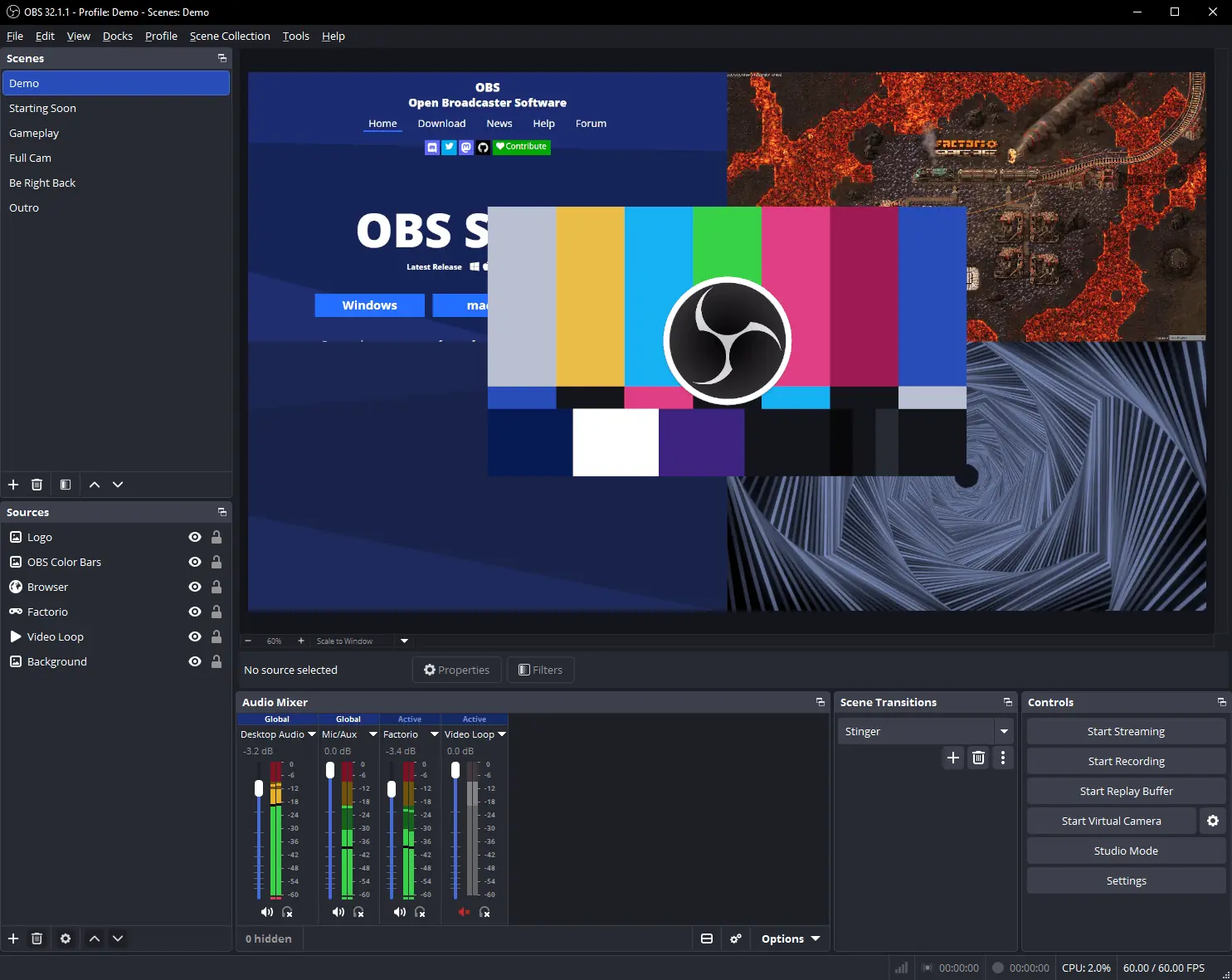
Scenes act as complete layouts, while sources can include windows, displays, games, cameras, capture cards, browser overlays, media, images, and text. Studio Mode allows a creator to prepare the next scene before sending it live. A carefully named scene collection is easier to maintain than a single overloaded layout.
Recording and streaming quality
OBS exposes encoder, bitrate, resolution, frame rate, color, audio, and recording-container settings. That control is valuable but creates room for mistakes. Hardware encoding can reduce CPU load, while a quality-oriented local recording should usually be configured separately from a bandwidth-limited live stream. Short test recordings are essential.
Audio workflow
The mixer supports per-source gain, noise suppression, noise gate, compression through available filters, monitoring, and VST plugins. Audio problems often come from duplicate desktop capture, incorrect sample rates, clipping before OBS, or monitoring loops. Creators should label inputs clearly and verify tracks before going live.
Plugins and automation
OBS has a large plugin ecosystem for transitions, docks, capture methods, virtual cameras, remote control, and automation. Version 32 introduced a plugin manager foundation, but compatibility still matters. Install only maintained plugins from trusted sources, document versions, and avoid major upgrades immediately before a critical event.
OTHER OPTIONS
Alternatives
OBS is stronger when the creator needs flexible live composition, local control, and platform independence. StreamYard and similar browser services are easier for remote guests and team production, while CapCut, Premiere, and Resolve are better for detailed post-production. OBS often sits at the capture stage before footage moves into an editor.
COMMON QUESTIONS
Frequently Asked Questions
Is OBS free? Yes. Does it add a watermark? No. Can it record without streaming? Yes. Does it work on macOS and Linux? Yes, within current system requirements. Is it safe to install plugins? Only use trusted, maintained sources and verify compatibility. Does OBS edit finished videos? It is primarily a capture and live-production tool, not a full nonlinear editor.
KEEP EXPLORING
Related Buying Guides
 Creator AudioBest USB Microphones for Content Creators in 2026: Five Picks for Different Rooms and WorkflowsRead more →
 Creator WorkflowBest Tools for Video Creators in 2026: An AI-to-Publish WorkflowRead more →
 Studio SetupBest Creator Desk Upgrades in 2026: Camera, Microphone, and LightingRead more →
KEEP EXPLORING